
/Product4 min read
Tavily vs. Gemini's Grounding with Google Search: When Native Search Isn't Enough
On SealQA-Hard, Gemini with Tavily Advanced scored 7.5 percentage points higher in accuracy and used fewer searches than Gemini with native search. See why higher accuracy comes from better context and how to get it.

A question we get often is, "If Gemini has built-in Google Search, why add Tavily?"
Native search is convenient, and for many applications it's enough. But when an agent depends on web search, retrieval quality becomes part of your product's quality. Which sources does it use? What context reaches the model? Can you trace a bad answer back to the search results? And what happens when you change models?
To test this, we ran Gemini with its native search against Gemini with Tavily Advanced on SealQA-Hard, a set of 254 questions that require finding and combining information from across the web. With Tavily, Gemini was more accurate, used fewer searches, and gave us full visibility into retrieval.
Higher accuracy comes from better context
We used the same Gemini model, system prompt, and evaluator in both setups. With native search, Google executed searches server-side. With Tavily, we registered search as a function tool: Gemini requested a search, and our evaluation harness called Tavily and passed the results back to the model. The harness capped Tavily at 10 searches per question; native search did not support an equivalent cap.
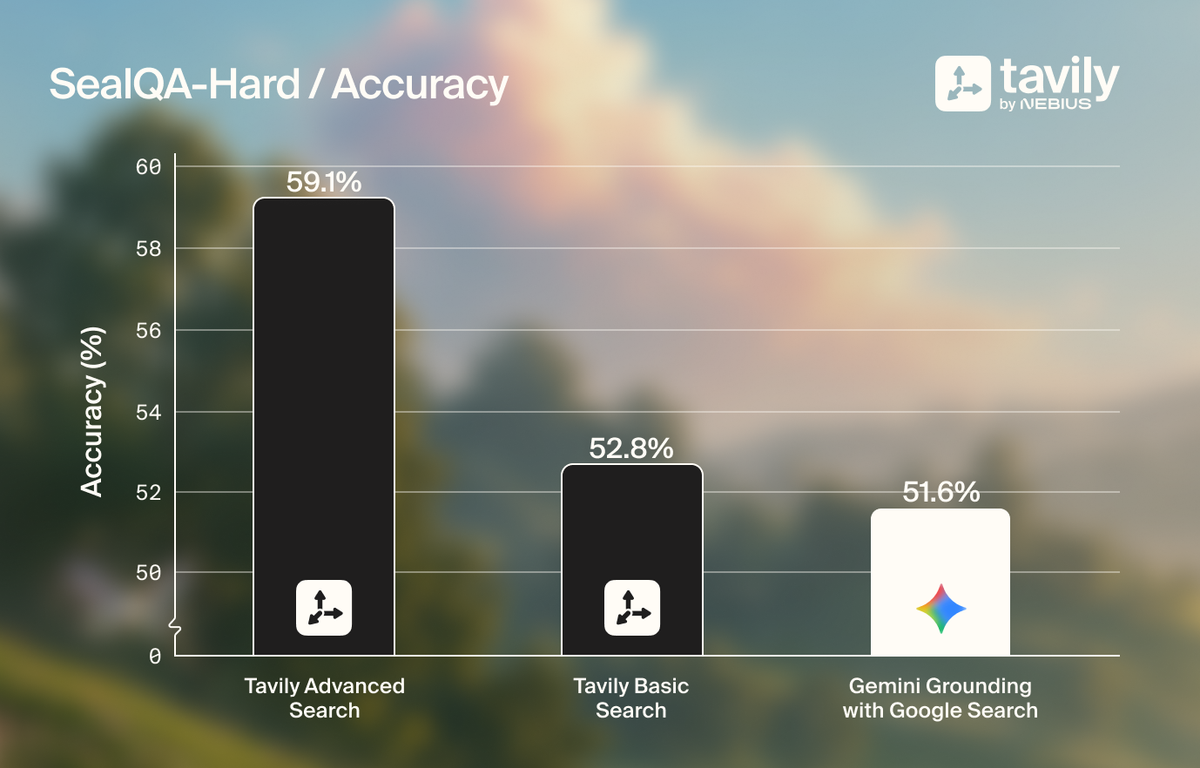
Tavily Advanced outperformed Gemini's native search by 7.5 percentage points on accuracy.
The difference comes from context quality. Search responses can contain useful information surrounded by irrelevant or redundant context from nav bars, ads, or even cookie banners, giving the model more to sift through without helping it reach the right answer. Tavily returns relevant, information-dense results, so the model has better material to reason over.
Control how your agent searches
Different workflows need different retrieval behavior.
A financial research agent may need to restrict sources to company filings and regulatory sources. A news agent may prioritize recent coverage. A general assistant may use light retrieval for simple questions and deeper searches for complex ones.
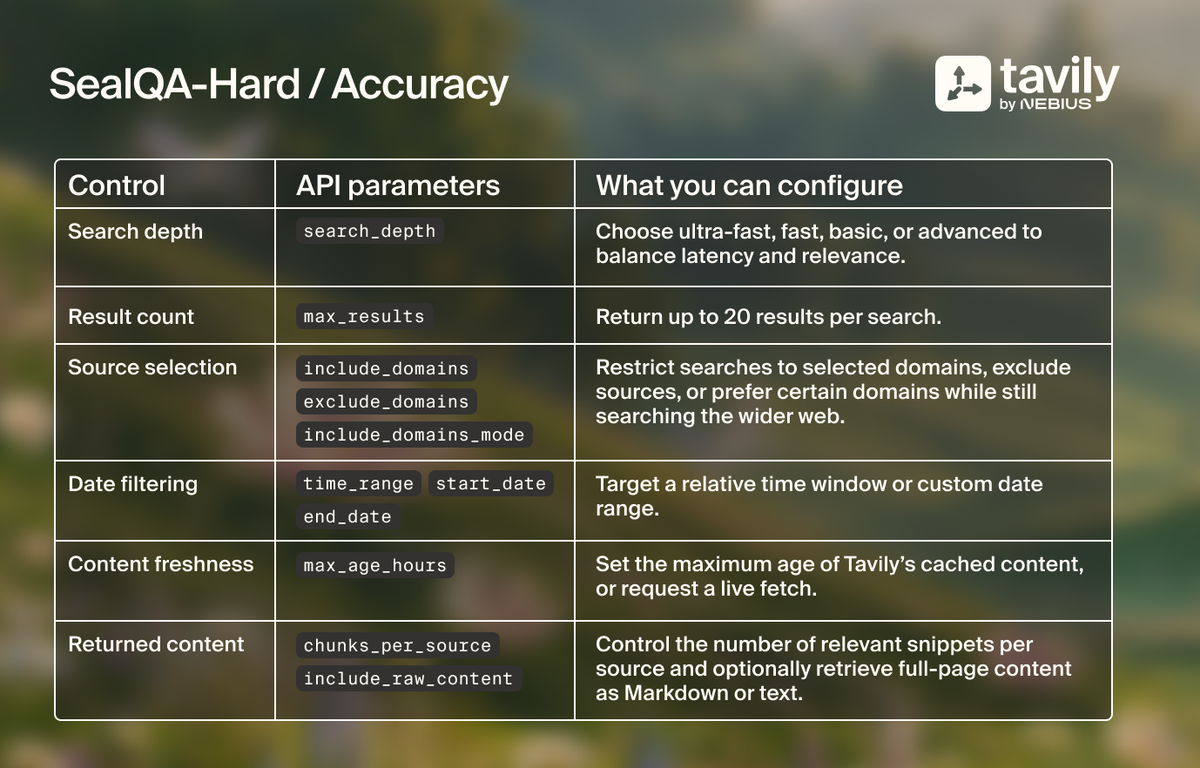
Tavily gives developers explicit control over how agents search and what content reaches the model. Here are a few of the API parameters you can use to tune retrieval to your workflow:
Control also extends to how many searches your agent can make. In our evaluation, we enforced a maximum of 10 Tavily searches per question through the agent harness; Gemini’s native search did not support an equivalent cap and exceeded 10 queries on 36% of questions. Under these different constraints, the Tavily workflow averaged 3.4 searches per question versus 9.9 for native search, while achieving higher overall accuracy.
Get visibility into what your agent retrieved
When an agent gets an answer wrong, the first question is whether retrieval or reasoning failed. Answering it requires both the results the model was given and the queries it ran.
Tavily returns each search as a list of results. Every result carries its URL, page title, relevance score, and extracted content. In our evaluation, searches with Tavily Advanced returned results that included all four aspects. That means any answer can be traced to the exact text the model read.
Gemini's built-in search returns the queries the model ran but not what came back. Each search result contains only a Google search-suggestions widget, with no direct URLs, titles, or text. The only sources it exposes are citations on the final answer, and those appeared on 73 of 254 questions (29%). These are Google redirect links labeled with domain names, and none are tied to the queries that found them.
When Tavily's results contain the answer and the model still gets it wrong, the problem is in the prompt or the model. When they don't, you adjust the query or the retrieval settings. On most questions, Gemini's built-in search output doesn't let you make that call.
One search layer across every model
The model landscape changes quickly. A team might use Gemini today, an open-source model running on Nebius tomorrow, and a mix of models for different workloads six months from now.
When search is native to the model provider, your retrieval is tied to your model choice. Switch models, and you may have to switch search too. Tavily is model-agnostic. The same search layer works with Gemini, Claude, GPT, open-source, and self-hosted models, and integrates with LangChain, LlamaIndex, and MCP. You can pick the best model for each workload without rebuilding how your agents access the web.
Evaluate your retrieval layer
Native search is a reasonable default, and if it meets your quality, cost, and visibility requirements, it may be enough. But when production agents depend on the web, retrieval deserves its own evaluation.
In our SealQA-Hard tests, pairing Gemini with Tavily Advanced delivered:
- Higher accuracy: 7.5 percentage points above Gemini's native search.
- Search control: an enforced 10-search limit per question while achieving higher overall accuracy.
- Full visibility: access to the queries, retrieved content, and source URLs behind each answer.
Beyond the evaluation, Tavily gives teams configurable retrieval and a shared search layer across models.
Check performance with your own agents. Try Tavily for free.