
/Engineering9 min read
Hermes Agent Web Search: How to Wire Tavily Into a Self-Improving Agent
Hermes Agent is a self-improving, persistent AI runtime and its web backend influences how it learns. Here’s how Tavily plugs in to power higher-quality search, extraction, and research inside the loop.

TL;DR
- Hermes Agent is an open-source, self-improving agent from Nous Research that runs on infrastructure you control and learns from every session.
- Its web toolset exposes three tools — web_search, web_extract, and web_crawl — that all route through a single configurable backend. To add Tavily, simply choose it during onboarding.
- Because Hermes can persist every tool result into memory, full-text search, and auto-generated skills, the web backend has more blast radius here than in a stateless agent. A bad extraction doesn’t fail once - it gets summarized into MEMORY.md or compiled into a skill that future sessions reach for.
- Tavily plugs in two ways: as the native web backend and as an MCP server or CLI/skills bundle that add research and mapping to the planner’s toolbox.
What is Hermes Agent?
Hermes Agent is an open-source autonomous agent from Nous Research. It belongs to a rapidly growing category of self-hosted personal AI agent runtimes. Similar to peers such as OpenClaw or ZeroClaw, it isn’t a coding copilot tethered to an IDE or a chatbot wrapper around a single API. It’s a long-running process that lives wherever you put it - a $5 VPS, a Docker container, an SSH-reachable box, or serverless infrastructure like Daytona or Modal - and reaches you through whichever messaging platform you wire up (Telegram, Discord, Slack, WhatsApp, Signal, iMessage, Email, CLI, and a growing list, all bridged through one gateway).
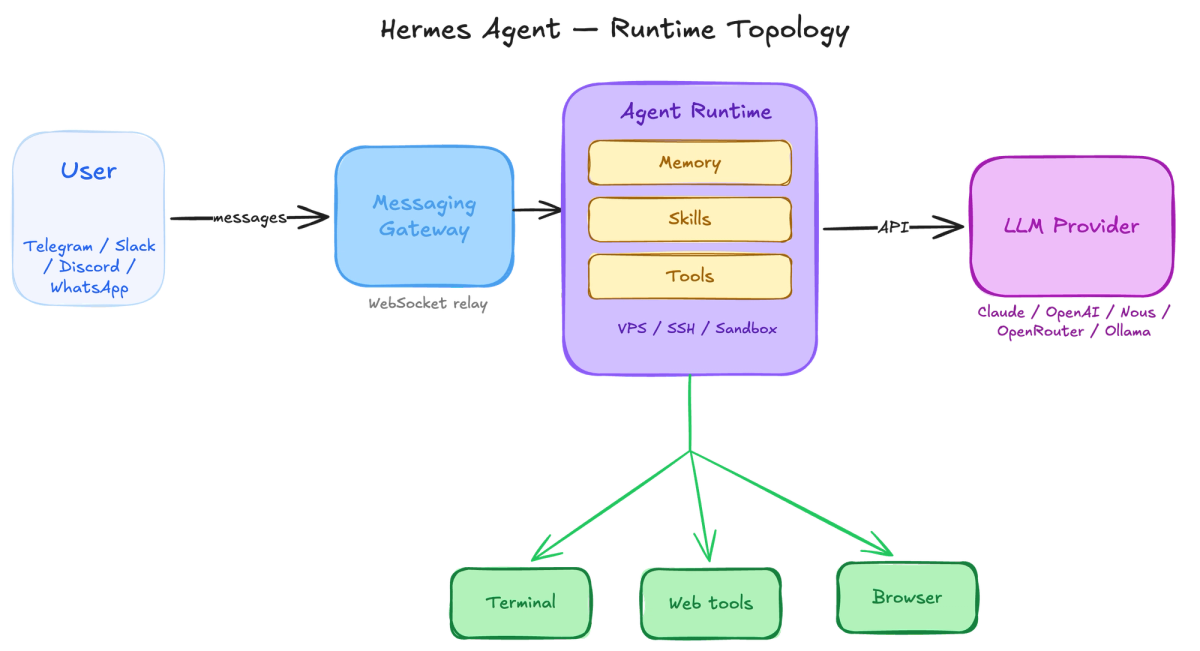
It’s MIT-licensed, model-agnostic (Nous Portal, OpenRouter, OpenAI, Anthropic, Google Gemini, Token Factory, local Ollama - anything with an OpenAI-compatible endpoint), and explicitly designed to run on infrastructure the user controls. No hosted SaaS, no vendor lock-in, full conversation state stored under ~/.hermes/. Since the launch, the project has crossed 100K GitHub stars and ships releases on a roughly weekly cadence.
What sets it apart from most agent frameworks is the learning loop. When Hermes finishes a complex task, it can write a new skill to disk and reach for that skill the next time a similar task comes up. Across sessions, that turns “general-purpose LLM behind an API” into “agent that knows my conventions, my projects, and how I solve things.”
That loop is also why the web backend choice matters more than usual. We’ll come back to that in a minute.
How Hermes’ web tools actually work
Hermes’ web toolset binds three tools that the planner composes against:
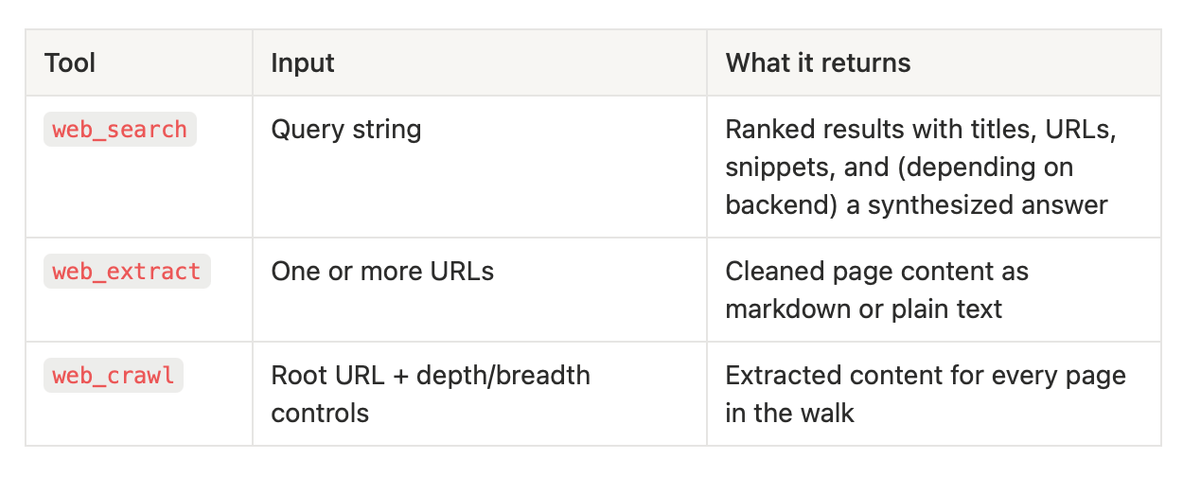
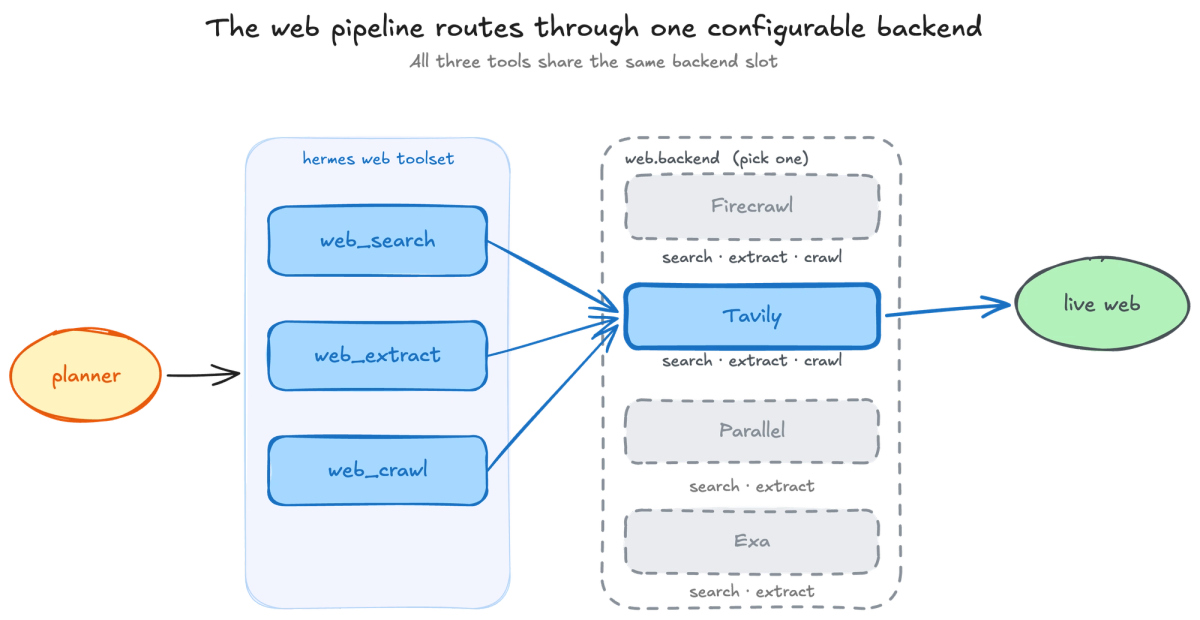
All three speak to a single backend at a time, picked via web.backend in ~/.hermes/config.yaml. If that key is unset, Hermes auto-detects from whichever provider key is present in ~/.hermes/.env.
That’s the whole pipeline: search returns links, extract reads them, crawl walks a site.
The web backend options
From the Hermes configuration docs:
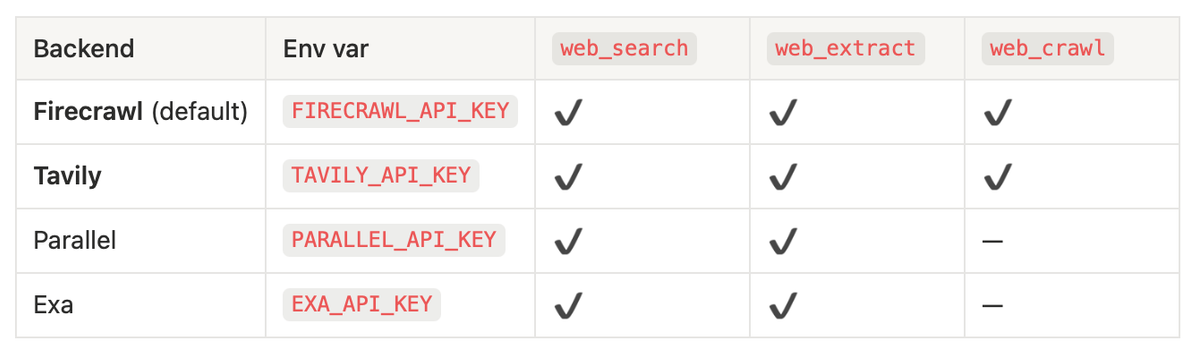
The shape of that table is load-bearing. Pick a provider that doesn’t support web_crawl, and any skill the agent has written that calls it won’t load — no docs-site survey, no competitor-domain audit, no full-domain ingestion. The planner will sometimes try to compose a workaround using web_search plus a fan of web_extract calls, but that’s bounded by search results, not topical coverage, and the resulting corpus is incomplete.
Why this is upstream of everything else
In a stateless agent, a bad web result fails the current task and disappears. In Hermes, every tool call is upstream of three persistence subsystems that run after most sessions:
- MEMORY.md and USER.md. Two markdown files that Hermes curates over time and updates based on the sessions. Both get injected into the system prompt at the start of every session.
- FTS5 full-text index. A SQLite-backed search layer over every past conversation. The agent queries it before reasoning on anything that might be a follow-up to prior work.
- Auto-generated skills. When a task uses five or more tool calls, the agent can enter a reflective phase: analyze its own trajectory, extract the reusable pattern, and write a SKILL.md. Skills are queried before reasoning — the planner prefers a known-good procedure over re-deriving the solution. The format follows the open agentskills.io standard, so the same skills work across Claude Code, Cursor, OpenClaw, and the rest of the ecosystem.
The compounding effect is the point — and it’s also where the failure mode lives. When web_extract returns navigation chrome and a “loading…” placeholder instead of article body, that output gets summarized into a memory entry or compiled into a skill anyway. The loop can’t tell the difference. Three weeks later, the agent reaches for a corrupted column and acts on it confidently. An empty extract that gets persisted is a failure mode that compounds invisibly.
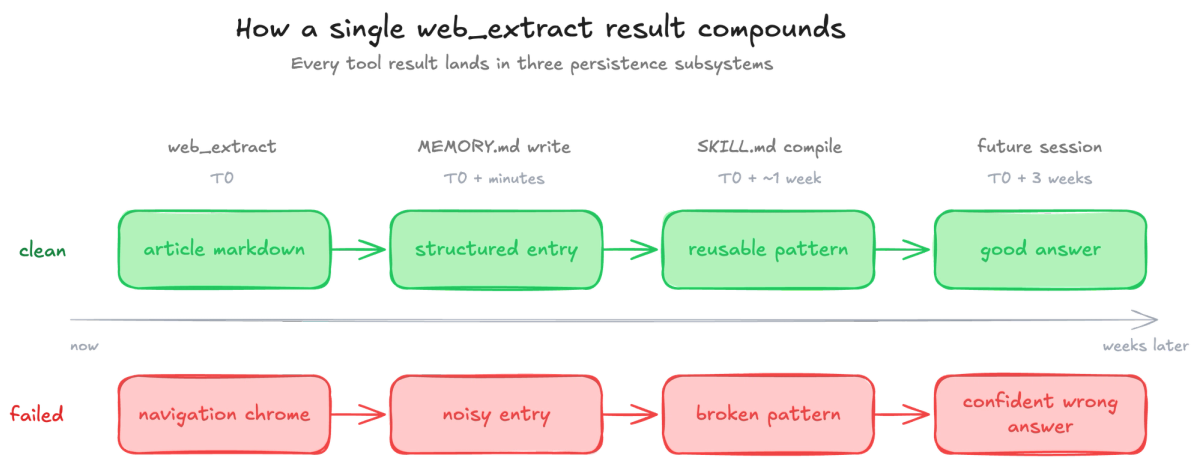
The web backend is the part of the harness with the largest blast radius. What gets returned today shapes what the agent reaches for next week.
What Tavily adds to Hermes’ web pipeline
Tavily connects to Hermes in two distinct ways. They solve different problems and you can run both at once.
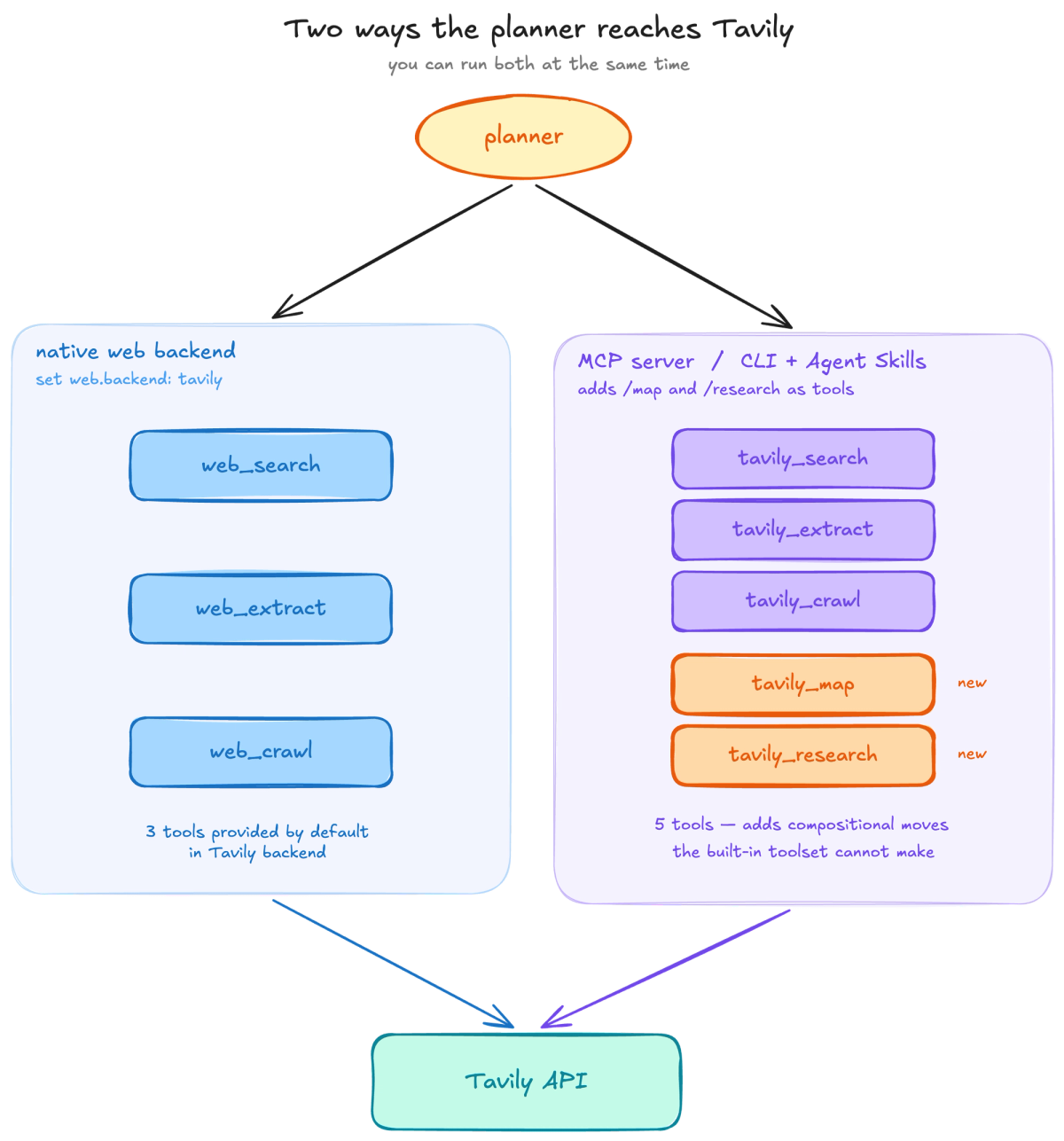
1. As the native web backend
Set web.backend: tavily and the same web_search, web_extract, and web_crawl the planner already calls now route through Tavily. Three things change for the planner:
- Search built for an agent reading the results, not a human scanning a SERP. Tavily’s web_search exposes topic, time_range, country, and include_domains/exclude_domains filters as first-class API fields. The planner can drive freshness or domain scoping directly instead of hacking it into the query string. That precision matters because the next session’s memory retrieval will index whatever the planner pulls back.
- Extraction tuned for the long tail. web_extract has an advanced mode that handles JS-rendered, bot-challenged, and table-heavy pages — the long tail that’s most expensive when it gets summarized into memory wrong. Plain HTTP fetchers stumble on these and return navigation chrome, which is not useful at all.
2. As an MCP server or CLI/skills bundle
The native web toolset binds three tools. Tavily’s API also exposes two endpoints Hermes’ core toolset doesn’t surface by default:
- /research — one-call multi-source synthesis with inline citations preserved per claim.
- /map — URL-graph audits that return the link graph of a domain without paying the extraction tax for pages you don’t care about.
Both are reachable as planner-visible tools either by registering the Tavily MCP server with Hermes’ MCP client, or by installing the Tavily Agent Skills bundle through the Tavily CLI. Both paths give the planner the same compositional moves; they differ in how the planner discovers them:
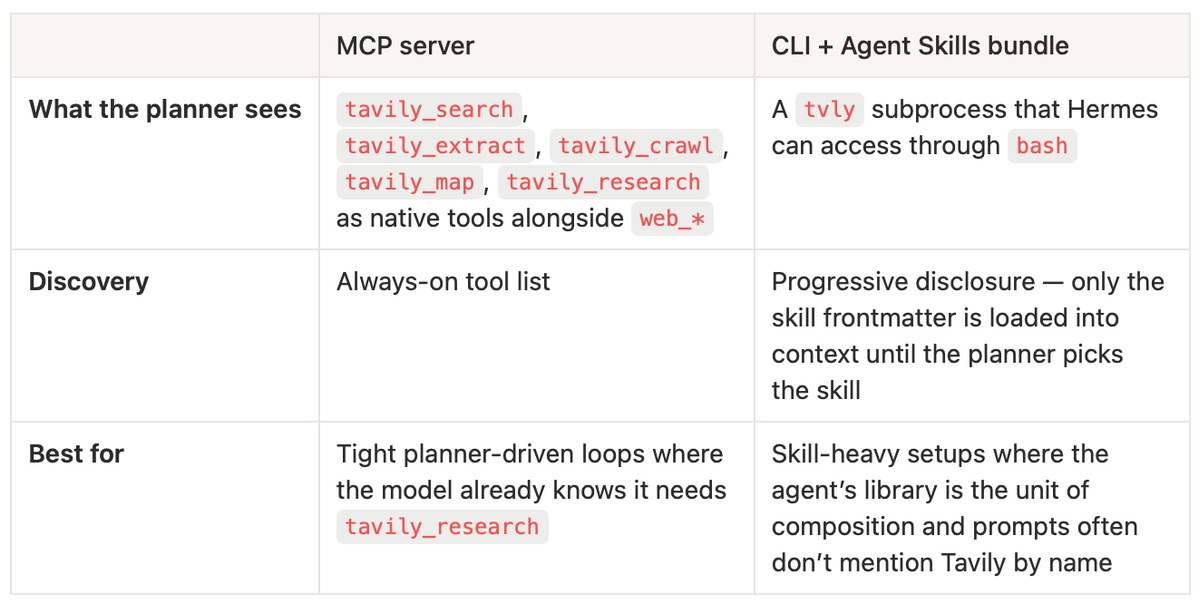
You can run both. The MCP path keeps the loop tight when the planner already knows the right tool. The skills path lets the planner discover it needs tavily-research from a prompt that never names it.
What you can build with this
The reason to wire all of this up is that Hermes ships a built-in cron scheduler with no daily run limits, a messaging-gateway layer, and the ability to fan out work across up to three subagents in parallel. Combined with Tavily’s surface, that turns into concrete patterns the planner can compose into skills:
Time-windowed monitoring. Cron + topic + a freshness filter is enough to run a weekly competitor-mention digest, a daily release-notes scan over a list of vendor domains, or a Monday-morning AI-news brief. The agent persists what it sees into memory; future runs skip what it already knows.
Selective ingestion: map → filter → extract. When you only need the changed pages of a docs site, run tavily_map first to get the URL graph, filter against last week’s snapshot, and extract only what’s new. Adding the Tavily MCP or CLI gives Hermes the ability to do this.
One-call cited research, delivered. tavily_research returns a synthesized brief with claim-to-source mapping intact. Wire it to the cron scheduler and a Telegram or Slack gateway and you have a research analyst that pings you on a schedule with sources you can verify. The citations preserve the audit trail when the brief later feeds into memory.
Setting it up
Install Hermes Agent
Install Hermes on Linux, macOS, or Windows (via WSL2):
curl -fsSL https://raw.githubusercontent.com/NousResearch/hermes-agent/main/scripts/install.sh | bashThe installer clones the project into ~/.hermes/, creates a Python virtual environment, and adds the hermes command to your path. Reload your shell (source ~/.zshrc or source ~/.bashrc).
Set Tavily as the web backend
Run the interactive setup wizard:
hermes setupWhen the wizard reaches the web backend step, pick Tavily:
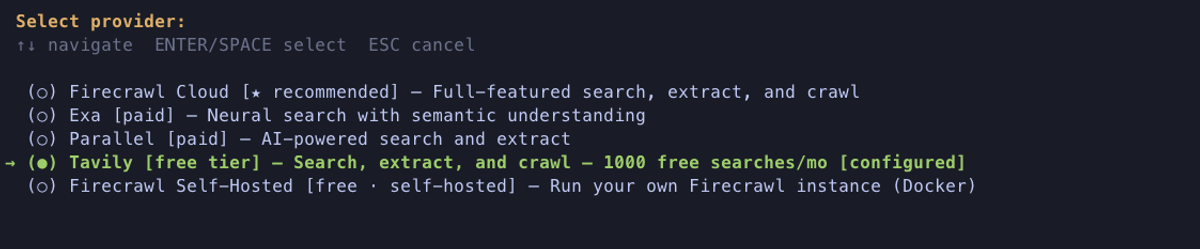
If you’ve already set up Hermes and want to switch backends, edit two files:
# ~/.hermes/config.yaml
toolsets:
- hermes-cli
- web

web:
backend: tavily
# ~/.hermes/.env
TAVILY_API_KEY=tvly-...That’s it. Verify with:
hermes config show
hermes
(Optional) Add the Tavily MCP server
To layer the MCP server on top, add it under mcp_servers in the same config file:
# ~/.hermes/config.yaml
mcp_servers:
tavily:
url: https://mcp.tavily.com/mcp/
auth: oauth
(Optional) Install the Tavily CLI and Agent Skills
To install the CLI and the Agent Skills bundle, run:
# install the tvly binary
curl -fsSL https://docs.tavily.com/install.sh | bash

# the installer will ask you if you want to install the Tavily skills bundle
# alternatively, you can install the Tavily skill manually
npx skills add tavily-ai/skills --all
Restart Hermes and /tools will show the new surface — the original web_* toolset, plus tavily_* from MCP, plus Tavily skills covering the core endpoints as well as dynamic filtering.
Conclusion
The reason the backend choice matters more in Hermes than in a stateless agent is that every result ends up in memory, in the FTS5 index, or compiled into a skill. The substrate the agent reads back from on future sessions is whatever today’s backend returned. Pick a backend that doesn’t cap coverage, with extraction clean enough that the persisted substrate is built from real content, and the self-improvement loop compounds in your favor.
Try it. Get a Tavily API key (free tier is 1,000 credits/month), wire it as the web backend, and set one cron job to run a Monday-morning AI-news brief with topic: news, time_range: week.
FAQ
Can I run multiple backends at once?
The native web toolset binds to a single backend. But you can layer the Tavily MCP server on top of any other backend — the planner sees web_search/web_extract/web_crawl from the configured web backend and sees tavily_search/tavily_extract/tavily_crawl/tavily_map/tavily_research as MCP tools. This is the sharpest setup if you want Tavily’s research and map endpoints without changing your existing web wiring.
Do I need both the MCP server and the CLI skills bundle?
No, either alone is enough to reach /map and /research. The MCP server makes them always-on tools the planner sees on every turn; the CLI + skills bundle keeps them out of context until a prompt matches a skill’s frontmatter. They compose if you want both.
Can I import OpenClaw skills?
Yes. Both Hermes and OpenClaw speak the agentskills.io standard, so a SKILL.md written for one drops into the other’s skills directory and works. The Tavily skills install identically in either runtime.
Can I run Hermes offline?
Yes — point it at a local Ollama model with at least a 64K context window and the agent loop runs without internet. The web toolset obviously needs connectivity, but the integration isn’t all-or-nothing; offline sessions still benefit from memory, skills, and the cron scheduler.
Is Hermes free and open source?
Yes. MIT-licensed, source on GitHub. You run it on your own infrastructure with no licensing fees — you pay only for whatever model API and web backend you wire in. Tavily’s free tier (1,000 credits/month) is enough to run the integration end-to-end while you evaluate.
Where do I get a Tavily API key?
Sign up at tavily.com and get a free API key. The free tier is 1,000 credits/month.